Motherboards button
เมนบอร์ด
Graphics Card button
การ์ดจอ
Monitors button
Monitor Gamer
Mini PC button
มินิพีซี
AIO Liquid Coolers button
ชุดระบายความร้อนด้วยน้ำแบบ AIO
Industrial PC button
พีซีอุตสาหกรรม
Server/WS button
เซิฟเวอร์/เวิร์คสเตชั่น
Loading

เราใช้ cookies เพื่อให้คุณได้รับความเป็นส่วนตัวและราบลื่นยิ่งขึ้น ด้วยการเข้ามาเยี่ยมชมเว็บไซต์ คุณตกลงใช้งาน cookies หากคุณไม่ตกลงในการใช้งาน cookies หรือต้องการข้อมูลอื่นเพิ่มเติม โปรดไปที่ นโยบายความเป็นส่วนตัว ในเว็บไซต์ของเรา.

คำถามที่พบบ่อย

หากคุณทราบดีเกียวกับหมวดหมู่ของคำถาม คุณอาจจะเลือกหนึ่งหมวดหมู่ด้านล่างสำหรับคำถามที่พบบ่อย หมวดหมู่.

ผล:
Q (537): How do I configure Realtek 5.1ch audio output on N100M under Windows 10?(10/29/2024)
A:Please follow the steps below.
1. Go to BIOS\Chipset Configuration and set Intel SST to "Enabled”.
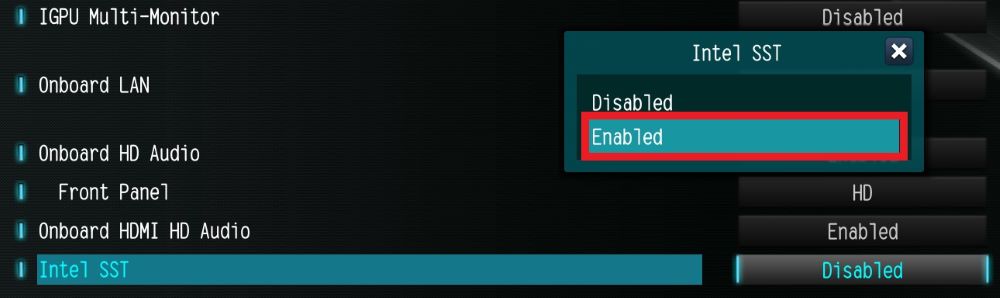
Go to BIOS\Chipset Configuration and set Intel SST to

2. Boot into Windows. Download and install Realtek high definition audio driver version:6.0.9503.1_RTK_SST and follow the instructions, restarting the system after the installation.
Realtek high definition audio driver ver:6.0.9503.1_RTK_SST:

https://download.asrock.com/Drivers/All/Audio/Realtek_Audio(v6.0.9503.1_RTK_SST).zip

3. After the restart, please check Device Manager > Sound, video and game controllers.

After the restart, please check Device Manager > Sound, video and game controllers.”

#N100M #Realtek #Audio #5.1 #HDMI #Audio #ISST #Intel #SST #surround #sound #no #sound #audio #driver #Intel #Audio #Win #10 #Windows