Motherboards button
Mainboard
Graphics Card button
Grafikkarte
Monitors button
Gaming-Monitor
Power Supply button
Power Supply
Mini PC button
Mini-PC
AIO Liquid Coolers button
AIO Liquid Coolers
Industrial PC button
Industrie-PC
Server/WS button
Server/Workstation
Loading

Wir verwenden Cookies, um Ihnen ein individuelles und reibungsloses Erlebnis zu bieten.
Wenn Sie diese Website besuchen, stimmen Sie unserer Verwendung von Cookies zu. Wenn Sie es vorziehen, keine Cookies zu akzeptieren oder weitere Informationen benötigen, lesen Sie bitte unsere Datenschutzerklärung.
FAQ

Fallls Sie wissen, in welche Kategorie Ihre Frage gehört, können Sie hier die Kategorie der häufig gestellten Fragen auswählen. Katalog:

Ergebnisse:
Q (Q&A-158|495): I cannot control the RGB lighting via RAZER Synapse on my X570/B550 Taichi Razer Edition motherboard. How do I solve this problem?(1/1/2021)
A:Please flash the RGB controller firmware by following the steps below.

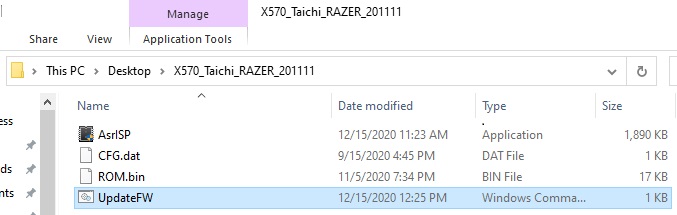
Step 1.
Download the firmware file from ASRock website and extract the compressed file.
Step 2.
Execute "UpdateFW.cmd” to update the RGB controller firmware.
2nd Execute UpdateFW.cmd
Step 3.
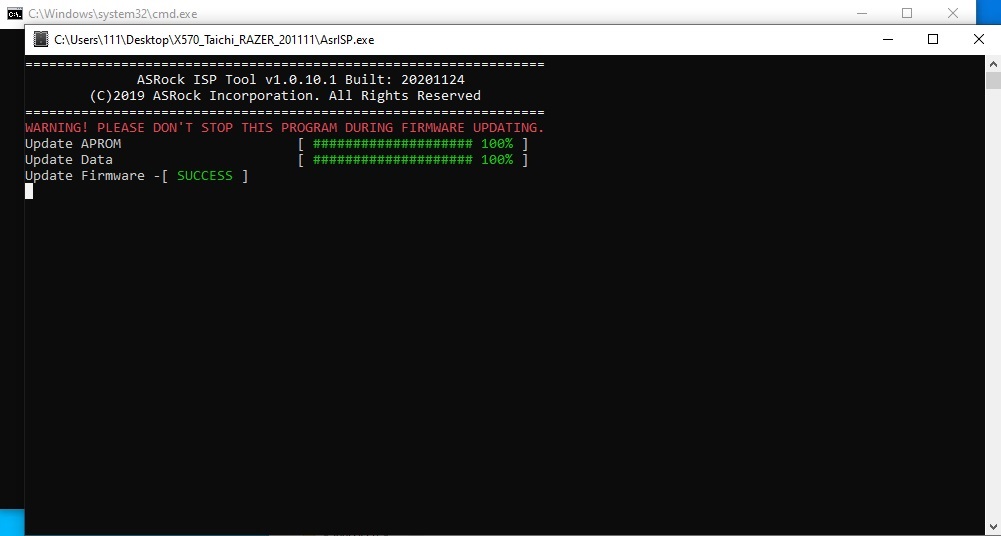
After step 2 please wait for 10 seconds or so and the firmware flash will finish.
3rd FW flash
Step 4.
After the message "update firmware SUCCESS” is shown please restart your system.