Instant Boot
Most of the people these days don't like to switch off computers everyday, we keep our computer up and running 24 hours a day, because it takes such a long time for our system to boot up again every time!
Now we have a good news, ASRock has overcome the technical obstacles and exclusively invented a new technology that allows you to turn on your PC in just a blink of an eye! Not only it saves energy, money, it also helps system running speed.
* This function is applicable ONLY to single user that does not secure ID and Password to their systems.
* The boot up time depends on the hardware configuration.
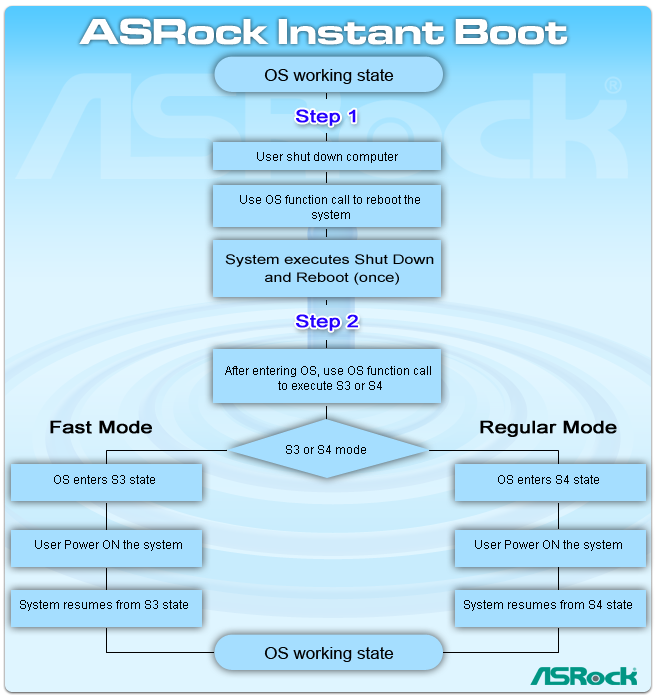
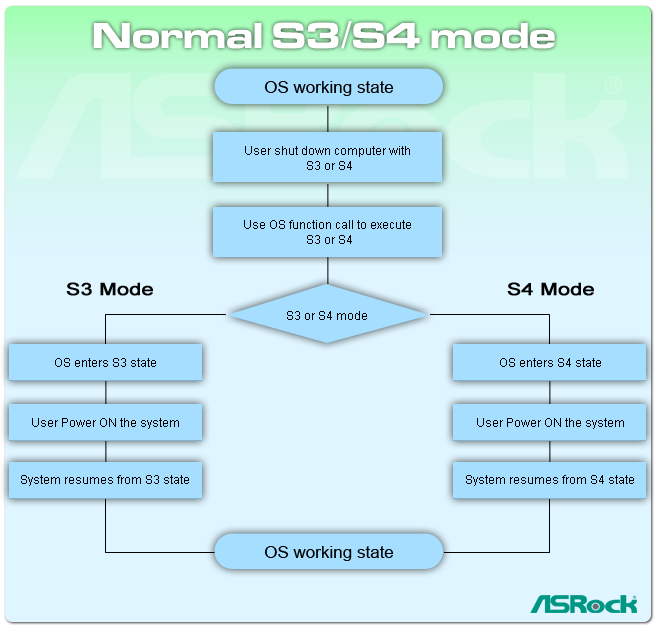
»Traditional Boot Up compare with ASRock Instant Boot
| Traditional boot up | Instant Boot |
| Fast Mode | Regular Mode |
| Boot Up Time |
Worse
 |
Best
 |
Good
 |
- Boot Up time of Instant Boot (3~4 sec.) is 10 times faster than traditional Boot Up time (50~60 sec.)!
- Even the Regular mode (20~22 sec.) is 3 times faster than traditional Boot up Time.
»No shut down compare with ASRock Instant Boot
| No Shut Down | Instant Boot |
| Fast Mode | Regular Mode |
| Cleanliness of OS |
Fair
 |
Best
|
Best
|
| Power Consumption |
Worse
|
Best
|
Best
|
- ASRock Instant Boot ensures clean OS.
No Shut Down will slow down system, causing no response to the applications or system hang due to accumulated garbage data.
- ASRock Instant Boot consumes only 1W to 3W power.
No Shut down system consumes 60~100W, which is 50 times bigger than Instant Boot.
»Normal S3/S4 compare with ASRock Instant Boot
| S3 | S4 | Instant Boot |
| Fast Mode | Regular Mode |
| Cleanliness of OS |
Fair
|
Fair
|
Best
|
Best
|
- ASRock Instant Boot ensures clean OS. S3/S4 will slow down system, causing no response to the applications or system hang due to accumulated garbage data.
»Pro and Cons of various shut down modes
From this sum up table, we can find that ASRock Instant Boot not only excels in the Boot Up speed (3~4 sec.), it also provides clean OS, and saves the most power energy.
|
No Shut Down |
Traditional boot up |
S3 |
S4 |
Instant Boot |
| Fast Mode | Regular Mode |
| Boot Up Time |
Best
|
Worse
|
Best
|
Good
|
Best
|
Good
|
| Cleanliness of OS |
Fair
|
Best
|
Fair
|
Fair
|
Best
|
Best
|
| Power Consumption |
Worse
|
Best
|
Best
|
Best
|
Best
|
Best
|
Installation Procedure
- Execute the Instant Boot installation program under Windows.
- After the installation is completed, you should find an Instant Boot icon on the Windows desktop.
- Double click the Instant Boot icon on the desktop, then Instant Boot main menu will pop up.
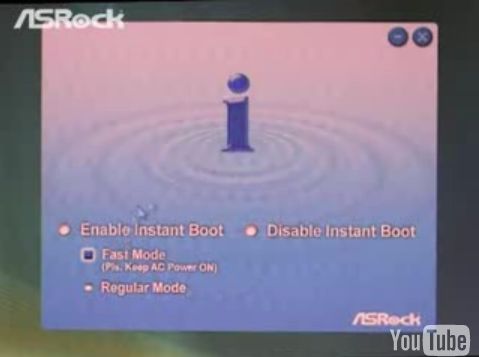
- On Instant Boot main menu, you can choose "Fast Mode", Regular Mode" or "Disable Instant Boot". After that, please click "Apply".
- When you want to shut down the computer, please simply select "Shut Down" from Windows "Start menu".
Support All Series of Models
Intel Socket 2011
Intel Socket 1366
Intel Socket 1155
Intel Socket 1156
Intel CPU Onboard Series
Intel Socket 775
| NVIDIA GeForce 7100 / nForce 630i | N73PV-S | | |
| NVIDIA GeForce 7050 / nForce 610i | N73V-S | | |
|
Intel Socket 478
AMD Socket AM3+ / AM3
AMD Socket AM3 (DDR3 support)
AMD Socket AM2+ / AM2 (AM3 CPU and DDR2 support)
AMD Socket AM1
AMD Socket FM2
AMD Socket FM1
AMD CPU Onboard Series
AMD Socket 939
AMD Socket 754
AMD Socket 462
CPU Onboard Series
Installation
 For users that have bought ASRock recent models, you could enjoy the Instant Boot function as well! All you have to do is to go to the following links to get the latest utility and BIOS.
Utility / BIOS updates
YouTube
ASRock had especially made a video clip, demonstrating the user interface, functions and fast boot up of Instant Boot function.